


A professional business letterhead does more than make a document look polished. It identifies the organization behind the communication, reinforces your brand, and helps recipients recognize official correspondence.
But modern business letterhead should do something else too: help recipients determine whether a document is actually authentic.
A logo, company name, address, and signature can all be copied into a fraudulent document. That is why businesses should think beyond appearance when designing their letterhead and consider professionalism, consistency, security, and verification.
In this guide, we’ll explain how to design business letterhead, what information you should include, common design mistakes to avoid, and how a verifiable letterhead can help protect your organization’s identity.
What Is a Business Letterhead?
A business letterhead is the branded heading used on official correspondence issued by a company or organization. It normally identifies the organization sending the document and provides important business and contact information.
According to the Government of Canada’s Language Portal, business letterhead generally includes information such as the organization’s logo or visual identity, address, telephone number, email address, and website.
For additional guidance on traditional business-letter formatting, see the Government of Canada’s business letterhead guidelines.
A well-designed letterhead gives documents a consistent identity whether they are delivered as printed letters, PDFs, or other digital correspondence.
What Should a Professional Business Letterhead Include?
The exact information depends on your organization and the type of correspondence you issue, but most professional letterheads should contain the following elements.
1. Company Name
Your organization’s name should be clearly visible. If your legal company name differs from the brand name you commonly use, consider whether displaying the legal name is appropriate for the document being issued.
2. Company Logo
A recognizable logo helps recipients immediately associate the document with your brand. Use a high-quality version of your logo and leave enough space around it so the header does not appear crowded.
3. Business Address
Include your primary business or mailing address when appropriate. An address can provide recipients with another point of reference when identifying the organization behind the correspondence.
4. Contact Information
Depending on your business, this may include:
- Telephone number
- Business email address
- Website address
- Relevant department contact information
Avoid placing so much contact information in the header that it competes with the actual content of the letter.
5. Website Address
Your official website gives recipients a place to learn more about your organization and find verified contact information. It can also provide a trusted path for document verification when your organization uses a verification system.
6. Document Verification Information
Traditional letterhead stops at visual branding. A modern secure letterhead can go further by providing a method for the recipient to verify the authenticity of the document.
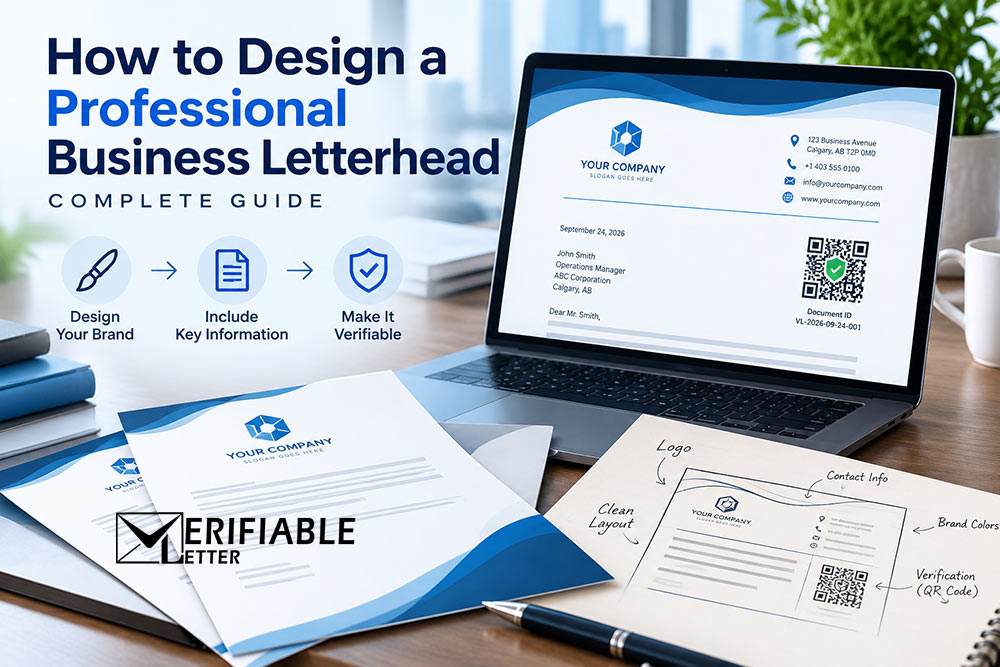
For example, documents created through VerifiableLetter can include a unique Document ID and QR code that recipients can use to verify the correspondence online.
How to Design Business Letterhead Step by Step
Step 1: Start With Your Brand Identity
Your letterhead should look like it belongs to your organization. Use the same logo, typography, and general visual identity used on your website and other official business materials.
Consistency matters. A recipient should not wonder whether a letter came from the same company whose website they just visited.
Step 2: Keep the Header Clean
A common mistake is trying to place too much information at the top of the page. Your letterhead supports the message; it should not overpower it.
A simple header containing your logo, organization name, and essential contact information is often more professional than a highly decorative design.
Step 3: Use the Footer Wisely
The footer is useful for secondary information such as your website, additional contact details, business information, or document verification details.
Keeping secondary information in the footer also creates more usable space for the actual correspondence.
Step 4: Choose Readable Fonts
Business correspondence should be easy to read on both screens and paper. Avoid decorative fonts for the main body of the letter.
The Government of Canada’s business correspondence guidance emphasizes clear, concise communication and consistent formatting. You can review its business letter formatting guidance here.
Step 5: Leave Enough White Space
White space is an important part of professional design. Give the logo, contact information, letter content, and signature enough room to breathe.
A clean design is generally easier to read and tends to reproduce better when a document is printed or converted to PDF.
Step 6: Design for Both Digital and Printed Use
Business correspondence is no longer exclusively printed. Your letterhead may appear in PDFs, email attachments, digital archives, or on physical paper.
Test your design in both formats. Make sure logos remain clear, text is readable, margins are appropriate, and important information is not cut off when the document is printed.
If your organization still relies on pre-printed stationery, you may also want to read our guide: Online Letterhead vs. Pre-Printed Paper Letterhead.
Professional Letterhead Is About More Than Appearance
Traditionally, organizations have used letterhead as a visual sign of authenticity. A document containing the correct company logo, address, colors, and signature naturally looks more credible.
The problem is that appearance alone does not prove authenticity.
A fraudster may be able to copy a logo from a website, reproduce company information, imitate a letterhead design, and create a document that appears genuine.
This creates an important question for the person receiving the document:
How do I know this letter actually came from the organization whose name appears on it?
This is where verifiable business correspondence becomes valuable.
From Professional Letterhead to Verifiable Letterhead
VerifiableLetter is designed to combine professional company letterhead with document verification.
Instead of relying only on the appearance of a document, correspondence created through VerifiableLetter can include a unique Document ID and QR code.
A recipient can use this information to check the document through the VerifiableLetter Verification Portal.
This creates an independent method of checking whether correspondence presented as coming from an organization was actually issued through its VerifiableLetter account.
Learn more about how online verifiable letterhead works.
How to Create Letterhead With VerifiableLetter
Creating company letterhead through VerifiableLetter is straightforward.
1. Create Your Account
Start by creating your organization’s account. You can sign up for VerifiableLetter and begin with the available free option.
2. Add Your Business Information
Add your organization’s logo and relevant business information so it can be used consistently across your correspondence.
3. Choose a Letterhead Design
Select a layout that works with your organization’s branding. You can explore professional letterhead designs and examples before deciding how you want your correspondence to appear.
4. Create Your Letter
Prepare your business correspondence using your selected letterhead rather than repeatedly creating separate Word documents or manually inserting your branding.
5. Issue a Verifiable Document
Your issued correspondence can contain its own verification information, allowing recipients to check its authenticity online instead of relying solely on logos, signatures, or visual appearance.
Common Business Letterhead Design Mistakes
Even an attractive letterhead can be ineffective if it makes correspondence difficult to use. Watch for these common problems:
- Too much information: Avoid filling the header with unnecessary details.
- Low-quality logos: Pixelated branding immediately reduces the professional appearance of a document.
- Too many fonts or colors: Keep the design consistent with your established brand.
- Poor print formatting: Always test how the document looks when printed on standard paper.
- Inconsistent designs: Employees using different letterhead files can weaken brand consistency.
- Outdated contact information: Old addresses, telephone numbers, or websites can remain unnoticed in saved templates.
- No authenticity mechanism: A professional-looking document can still be copied or forged.
Why Letterhead Security Matters
Your company’s logo and name are public information. In most cases, anyone can see them on your website, social media pages, advertisements, or previously issued documents.
That means simply placing a logo on a PDF should not be treated as proof that your organization issued it.
Fraudulent correspondence can potentially be used for fake job offers, payment instructions, false business proposals, impersonation, misleading announcements, and other scams.
Organizations therefore need to think about two different objectives:
- Branding: Does this document clearly represent our organization?
- Authenticity: Can the recipient determine whether we actually issued it?
A good business letterhead addresses the first question. A verifiable business letterhead can help address both.
For a deeper look at this issue, read How VerifiableLetter Enhances Letterhead Security.
What Makes a Good Business Letterhead?
The best business letterhead is not necessarily the most elaborate. It should be professional, recognizable, readable, consistent, and practical.
A strong modern letterhead should:
- Clearly identify the organization
- Use consistent company branding
- Provide appropriate contact information
- Look professional in both digital and printed formats
- Leave adequate space for the actual message
- Be easy for authorized staff to use consistently
- Provide a way to establish authenticity when verification is important
Design for Trust, Not Just Appearance
A beautifully designed letterhead can create a strong first impression, but today’s businesses should expect more from their official correspondence.
When customers, employees, vendors, applicants, and members of the public receive a document carrying your organization’s name, they should have an easy way to determine whether that communication is genuinely yours.
That is the difference between a letterhead that simply looks official and correspondence that can actually be verified.
VerifiableLetter brings professional letterhead design, document management, and verification together so businesses can create official correspondence while giving recipients a straightforward way to check authenticity.
Ready to create professional, verifiable business letterhead?
Create Your Free VerifiableLetter Account
Many Letterhead Designs to choose from. Sign Up to view.